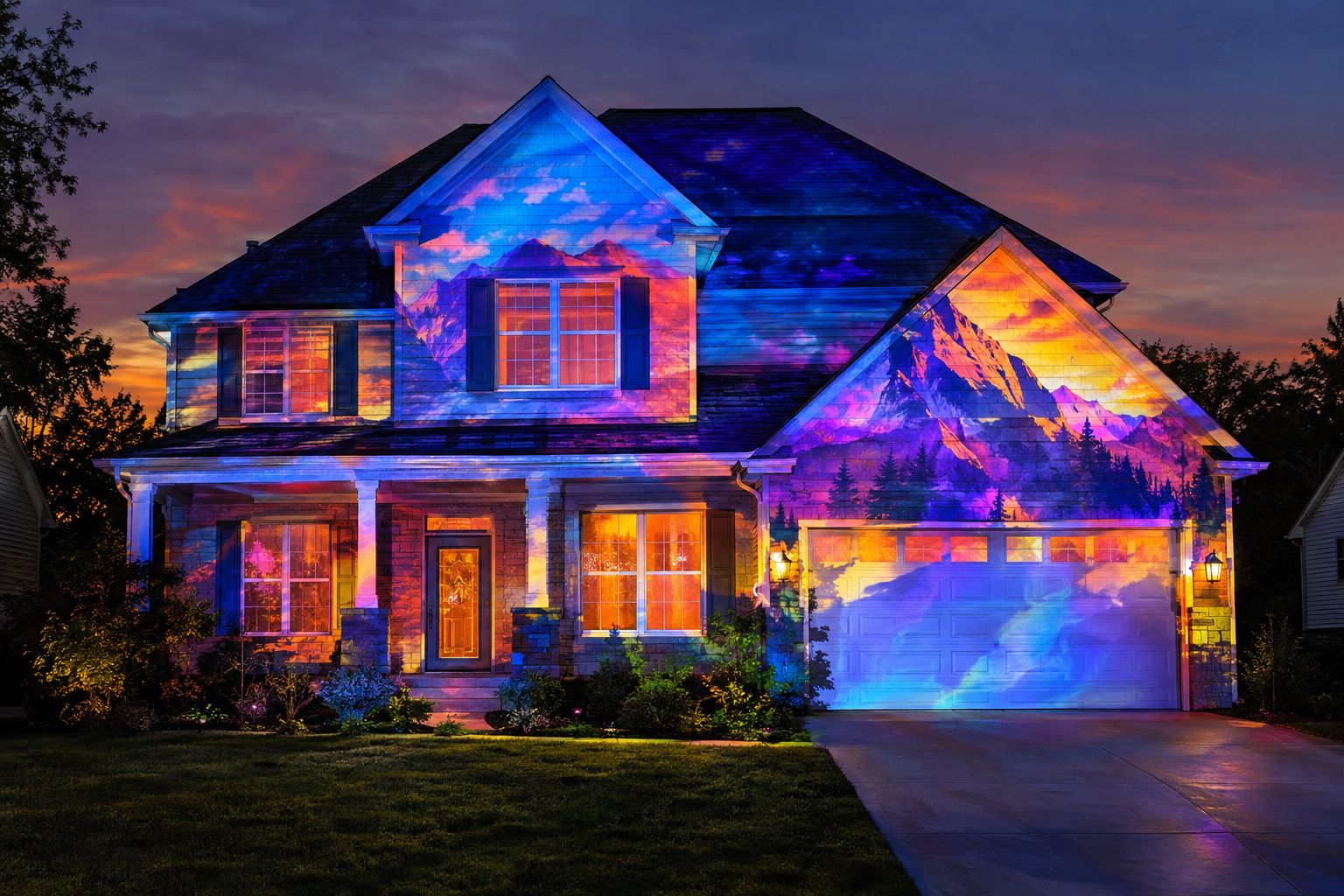
Whole house projection mapping unlocks a world of creative possibilities, transforming your home’s exterior into dynamic art, festive shows, or immersive displays. Whether you’re dreaming of spectacular holiday decor, special occasion magic, or simply surprising the neighborhood, this comprehensive homeowner’s guide walks you through every step—from initial ideas to a dazzling presentation.
What Is Whole House Projection Mapping?
Projection mapping lets you project finely-tuned visuals—including animations and effects—onto your house, garage door, windows, and even landscaping, turning simple surfaces into storytelling canvases. Carefully calibrated images fit the unique shapes and contours of your property, delivering a professional-grade visual experience for holiday festivities, birthdays, graduations, and more.
- Façade projection covers the main face of your home with tailored visuals.
- Garage projections transform large, flat doors into eye-catching displays.
- Window mapping uses Window Mapping Film on the outside of the glass, so projected light shows on the windows instead of passing through.
- All mapping is dynamic, precise, and can be synchronized with audio or interactivity.
Essential Planning for Residential Projection Mapping
While ambitious, whole house projection mapping is fully achievable for motivated homeowners. Careful upfront planning pays off in smooth setup and dramatic results.
- Define your goals: Holiday spectacle? Birthday surprise? Artistic expression?
- Assess your canvas: Measure the width, height, and architectural features (windows, doors, gables, columns) of your target surfaces.
- Consider viewing distance: Greater throw distances require higher brightness and resolution.
- Choose projection zones: Decide which façade sections, garage doors, or windows will be mapped together, independently, or left dark.
- Identify environmental factors: Check sunlight patterns, streetlights, landscaping, and local ordinances.
Projector Throw and Brightness Considerations
Projector throw distance and lumen output are vital for crisp, impactful images across large residential surfaces. Each home is unique, so select a projector that matches your layout and desired image size.
- Throw distance: This is the distance from the projector to the surface. Placement must ensure the entire mapped area is covered without distortion.
- Brightness: Higher lumens enable vivid images, especially on darker houses or where there is ambient light.
- Resolution: Look for sufficient resolution to keep details sharp over large areas.
- Lenses: Ultra-short throw lenses may be helpful where space is limited.
ProjectionMappingSupply.com recommends contacting our support team for tailored advice based on your specific home measurements and budget.
Start with the Homeline Projector Enclosure
For most residential projection-mapping projects in mild climates, Homeline is our first recommendation. Its compact, fan-cooled design is intended for homeowners who want to protect a compatible projector without stepping up to a larger commercial enclosure. Whether you are planning Halloween effects, Christmas animations, or a weekend garage-door projection, start by checking Homeline compatibility with your projector.
- Best starting point: residential mapping in mild weather conditions.
- Compact alternative: consider a Small Integrator when the project needs a professional enclosure configuration.
- Harsh-weather option: consider a Small Defender for salt air, high humidity, or demanding environments, subject to its 500 W thermal limit.
Explore Homeline & request projector-fit guidance
Enclosure fit depends on projector dimensions, lens placement, ventilation, and electrical requirements. Confirm compatibility before ordering.
Choosing the Right Enclosure for Your House
Selecting a suitable projector enclosure is essential for safety, longevity, and image quality. Enclosures protect projectors from dust, weather, temperature swings, and curious wildlife. Compare options below to find your best fit:
| Enclosure | Climate/Application | Residential Fit Guidance |
|---|---|---|
| Homeline | Compact, fan-cooled; mild climates; ideal for homeowners’ short-term use | First choice for most residential projects in mild climates. Confirm projector dimensions, airflow and lens alignment. |
| Small Integrator | Professional-grade; fan-cooled; moderate environments; longer runtimes | Small Integrator: secondary option when a compact professional enclosure is needed; verify projector fit. |
| Small Defender | Climate-controlled; salt-air, high humidity, harsh weather; year-round protection | Small Defender: specialty option for coastal, humid or harsh environments; maximum projector heat load 500 W, subject to physical fit. |
Check ProjectionMappingSupply.com for detailed product descriptions and support with sizing, airflow, and installation. Not all enclosures fit all projectors—consult before purchase.
Window Projection & Mapping Film Tips
Windows and glass doors can be mapped for striking visual effects, but require careful treatment for best results:
- Window Mapping Film goes on the outside of suitable windows and gives projected light a surface to catch, so windows join the show instead of leaving dark gaps.
- Rear Projection Film is a different product: it turns a suitable window or clear panel into a screen you project onto from behind.
Not sure which film suits your windows? Ask our team.
Step-by-Step Setup for a Dazzling Residential Mapping Show
- Survey and photograph your house during daylight from the projector’s intended position.
- Develop or acquire 3D models of your façade, marking all architectural features and shadow lines.
- Plan your projector placement to avoid physical obstructions and ensure safe cable routing.
- Install projector enclosure(s) securely, checking alignment with your mapping zone.
- Run power and any data/signal cables through weather-protected paths away from trip hazards.
- If you are mapping windows, have Window Mapping Film applied to the outside of the glass first.
- Calibrate mapping software (see next section) to fine-tune keystone, warp, and overlay settings.
- Test with full-brightness images at night and adjust visuals as needed until the mapping fits perfectly.
Software, Content, and Mapping Calibration
Projection mapping software bridges your visuals and your physical house, translating your creative vision into reality. Many user-friendly and pro-grade packages are suitable for residential shows:
- Import your house photo or 3D model to your chosen mapping software.
- Warp and align your media to match physical features: window outlines, rooflines, garage doors.
- Create or license content—such as animated holiday graphics, themed scenes, or family messages.
- Sequence multiple zones: Facade, garage, and window displays can be mapped individually or as a combined show.
- Common software options include dedicated commercial mapping programs and more affordable DIY solutions—each with a learning curve.
If help is needed, consider contacting ProjectionMappingSupply.com for software suggestions.
Electrical & Weather Safety Checklist
Safety is paramount—outdoor projection systems involve mains power and high-output light sources:
- Use GFCI (ground fault circuit interrupter) outlets for all outdoor equipment.
- Check extension cords and power strips for weather resistance and rated capacity.
- Avoid running low-voltage signal/data cables where they can be tripped on or exposed to moisture.
- Choose an enclosure for your climate: fan-cooled Homeline for mild weather, climate-controlled Defender for wet, humid or coastal sites.
- Monitor enclosure temperatures—even in fan-cooled models—if running projectors for extended periods.
- Do not operate projectors unattended during severe weather unless using climate-controlled Defender models designed for harsh conditions.
- Verify all mounts and stands are stable against wind and tampering.
Key Benefits of Whole House Projection Mapping
Bring your home to life with seasonal stories, custom messages, or stunning art—without paint or permanent fixtures.
Refresh your visuals for every occasion, from holidays to birthdays, all in the same hardware setup—no renovations required.
Host unforgettable gatherings—from neighborhood light shows to cozy family evenings—all made possible by creative projection.
Frequently Asked Questions
Brightness depends on your surface color, throw distance, and ambient light. Brighter is better for large or light-colored homes. Contact us for advice tailored to your space.
With a weather-appropriate enclosure, such as the Defender, year-round exterior use is possible. Fan-cooled Homeline or Integrator units are better for mild weather and short-term events. Always protect equipment during extreme conditions.
Yes, mapping software can calibrate displays to fit complex surfaces, but more intricate architecture may require advanced setup and testing.
Window Mapping Film is designed to stay largely see-through when the projector is off, though the look varies with the glass and lighting.
Yes, many mapping software packages allow you to synchronize visual effects with audio playback for a fully immersive show.
Motivated DIYers can achieve excellent results with planning and support. For larger or permanent setups, professional installation and mapping services are advisable.
Ready to Map Your Home? Start with Homeline.
Contact ProjectionMappingSupply.com to request a personalized quote, get help choosing projectors and enclosures for your whole house projection mapping project.